

Our Design Docs Write Themselves
How markdown files, a Zoom bot, and the Claude Code SDK replaced our design review cycle.


Abnormal AI stops the cyberattacks that legacy tools miss. If your company still treats AI like a pilot program, you’re in the wrong place. AI-powered engineering is our default, and we’re hiring.
I used to write the design while AI coded the software. Then the AI started writing the design too. We threw an unreleased security product’s PRD into our spec tool, and it produced an 80-page technical plan we shipped as a dogfooding demo for our internal security team within a week. Today, all design reviews and technical plans company-wide are generated through this tool.
Most engineering teams still run the same assembly line. Sprint planning, design review, implementation, code review, QA, deployment. AI gets injected at individual stations, but the line stays the same. Optimizing each station with AI makes the line faster. Deleting the line entirely and replacing it with a spec that an agent executes is a different thing.
The industry is converging on this. GitHub launched Spec Kit. Amazon built Kiro. Google Devs called spec-driven development “essential for AI agents.” A good spec is simultaneously a review artifact for humans and a deterministic contract for agents. Once you have that, the planning process compresses. What used to be a multi-week design-review-implement cycle is now something engineers on our team do in a day. The bigger gain is parallelization. An engineer can have three specs in flight at the same time, each progressing asynchronously through review and implementation. When planning is cheap, you can also spec several competing approaches in parallel and evaluate them side by side before committing to one. Prediction gets replaced by projection.
Here’s how we built a spec-driven workflow that auto-updates from design meetings, enforces security and legal guardrails before a line of code is written, and lets anyone (including PMs and data analysts) architect production changes. We’re open-sourcing the template at the end.
The Markdown Architecture
Most AI-generated plans are bad because they lack context. Point Claude Code at a production codebase and ask it to plan a feature. It produces something that looks right but violates half your org’s practices. It doesn’t know you use DynamoDB for P0 systems. It doesn’t know customer data must include a canonical tenant identifier. It doesn’t know cross-region data flows require Legal sign-off.
We call this design slop. The AI rearchitects things instead of following conventions. We had early plans that used non-standard tools without flagging the need for review. Native plan modes in existing AI IDEs are improving, but a specialized solution that forcibly injects organizational knowledge produces consistently better results, especially when the goal is replacing the process rather than accelerating it.
We solve this with a set of core system files in the repo under .ai-dev/:
ARCHITECTURE.md encodes how we build things. Language selection, database rules, cellular architecture, event-driven patterns, AI/ML service integration, API conventions.
LEGAL.md encodes how we handle data. Classification, minimization (”no collect for future AI use”), retention, residency, AI model constraints (”never use customer data to train shared models”), escalation triggers.
SECURITY.md encodes how we protect things. Data classification tiers, approved storage, API auth requirements, multi-tenancy isolation, encryption, secrets management.
PLAN.md is the spec template itself. It defines the sections, the two-audience structure, and what the planning tool should produce (more on this below).
(View samples of these files on GitHub: @abnormal-ai/claude-plugins/tree/main/plugins/spec-tool/skills/build-spec-tool/references)
These aren’t documentation that someone writes and forgets to update. They’re operational constraints that the planning tool reads on every run, checking every proposed design decision and flagging violations with specific citations. Before a line of code is written.
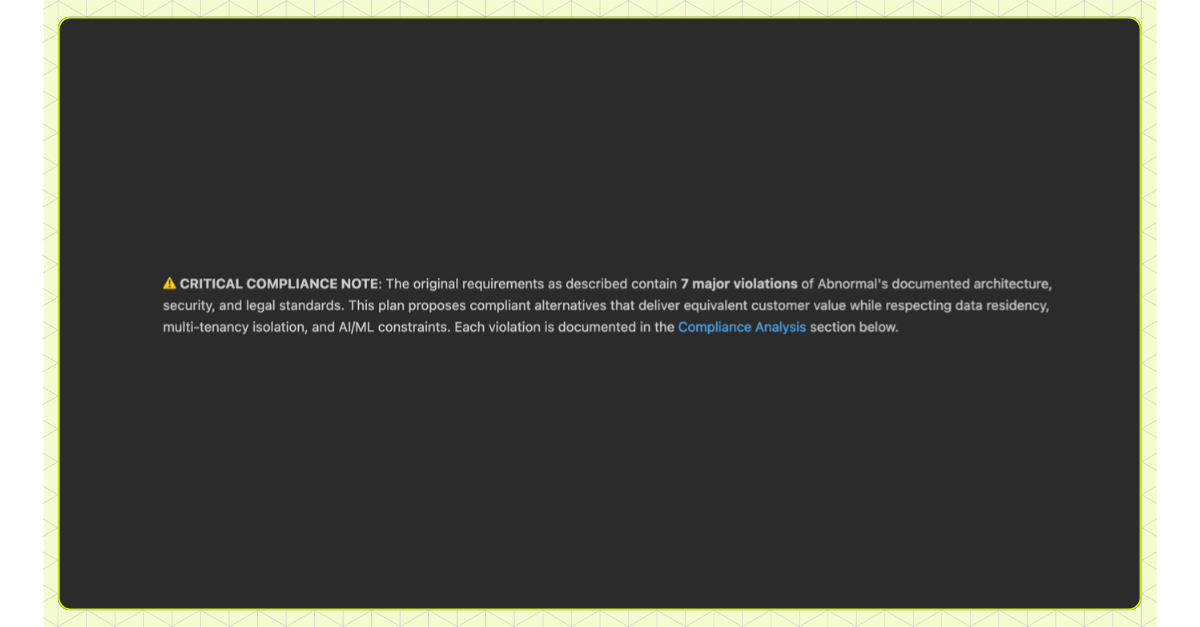
The repo’s CLAUDE.md and custom agent definitions also point to these files, so any engineer using Claude Code gets some of this context even outside the planning tool.
We bootstrapped these files by recording conversations with stakeholders and using Claude Code to explore our existing codebase practices. Now they’re maintained through the self-updating loop below and ongoing partnerships with non-technical teams (legal, security).
The Self-Updating Codebase
Keeping markdown files up to date manually is hard, especially when updates are tied to PR flows. Engineers attend a design review, raise important concerns, and walk away without updating a single file. The knowledge stays in the meeting recording.
So we automated it. Every week, an agent processes all recorded design review meetings (every review has our Zoom bot in the call), Slack threads, design docs, and samples of PR review comments, then generates a PR proposing updates to the system files. A human reviews and approves.
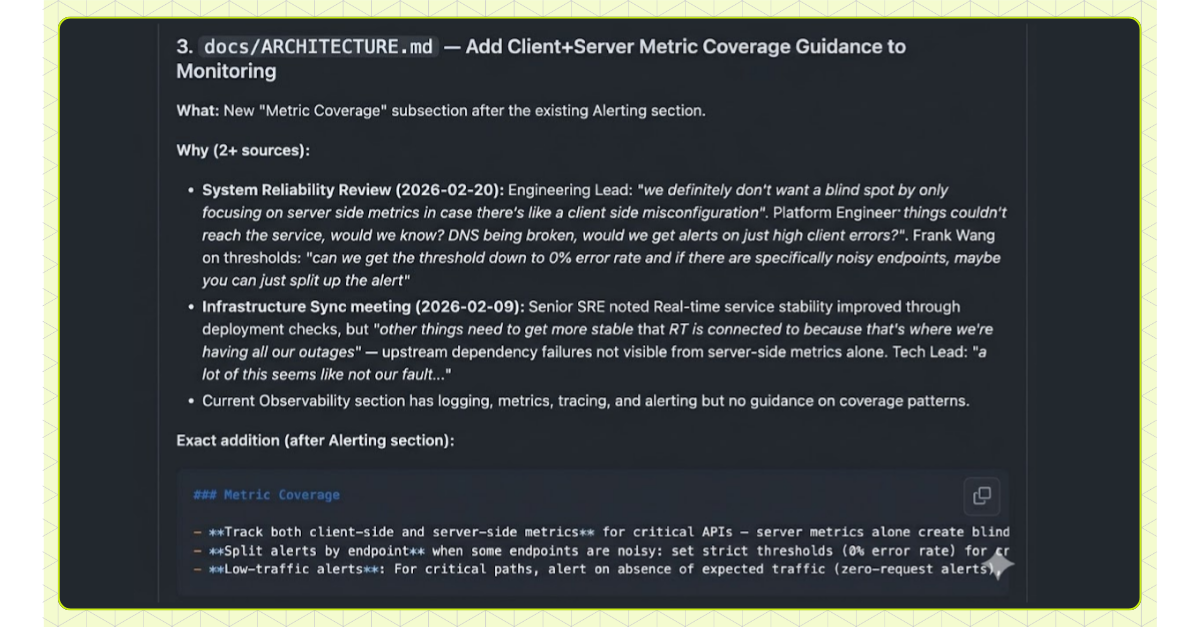
This creates a flywheel. Every design review is a review of a spec output. The feedback from that review feeds back into the system files. The next spec any engineer generates automatically incorporates it. Over time, the specs get better because every review is training the system, not just evaluating a single plan.
The Spec Template
The spec tool is a CLI built on the Claude Code SDK. We chose the SDK because it’s already the interface our engineers know (slash commands, macros, session management), and increasingly our internal tools are just system prompts wrapped around it. We run it out of our primary monorepo, with the additionalDirectories Claude Code setting pointing to other repos cloned locally.
The input can be anything from a full PRD to a few bullet points describing the problem, constraints, and code pointers. We call the lightweight version a concept doc: the most minimal description of an idea that gives the tool enough to work with. A team brainstorms a feature, writes down what they know, and the spec is generated from that. The input doesn’t need to be polished. It needs to be honest about what you want and what you know.
The Two-Audience Problem
Our first attempt was the obvious one. Get AI to generate our existing tech design doc format. It didn’t work. The existing template wasn’t designed as a prompt. It produced docs that read fine but gave background agents too little context to build from accurately. We had to redesign the format for AI, not just inject AI into the format we had.
The template now serves two audiences in one document. Getting this right was the hardest part. Early versions produced specs that were dozens of pages of implementation detail, technically correct but impossible for a human to review in a design session. We also learned to order sections by what matters most to a human reviewer: problem statement and goals first, then architecture, then trade-offs, then implementation details. If the problem statement is wrong, you stop there. You don’t need to read 40 pages of implementation to reject a flawed premise.
This matters more as AI generates a larger share of production code. Engineers lose their mental model of a codebase they didn’t write, and review fatigue turns approvals into rubber stamps. Skimmable plans that let a reviewer trace every change back to a problem statement and rationale are how you keep cognitive debt from compounding.
The top half is for human reviewers:
## Problem Statement
[What we're solving and why]

## Architecture Overview
[Mermaid diagrams of desired state]

## Key Design Decisions
1. **[Decision]**: [Rationale -- why this over alternatives]

## What We're NOT Doing
- ❌ Indexing full raw email bodies -- violates data minimization (LEGAL.md)
- ❌ Using OpenAI's API directly -- must use centralized LLM gateway (ARCHITECTURE.md)

## Stakeholders
| Stakeholder | How |
|-------------|-----|
| Legal / Privacy / Security | Must approve data flow design |
| AI Platform Team | Approve new model quota and access |

## Privacy and Security
[Detailed checklist: data classification, access controls, threat modeling]

## Testing Strategy
[Unit, integration, load, security, manual verification]
The bottom half is for agents. It was key for us to optimize this section to focus on function signatures and a mix of inline comments and actual code, balancing enough detail for a human to skim while being unambiguous enough for an agent to implement without drifting:
# Implementation Guide

## Phase 1: Core Data Pipeline

### Changes Required

#### 1. Threat Intelligence Aggregator
**File**: `src/py/threat_intel/aggregator.py`
**Changes**: New service for de-identified indicator aggregation

def aggregate_indicators(tenant_id: str) -> AggregatedResult:
  # 1. Query campaign fingerprints from customer cell
  # 2. Strip PII, hash sender domains
  # 3. Write to regional OpenSearch index
  # 4. Emit Kafka event for downstream consumers

### Verification

#### Automated Checks
- [ ] Tests pass: `pytest src/tests/threat_intel/`
- [ ] Type checking: `mypy src/py/threat_intel/`
- [ ] Linting passes

#### Manual Checks
- [ ] Query returns only de-identified indicators (no PII leakage)
- [ ] EU tenant data stays in EU regional index
Specs also drastically increase adherence to our architectural and compliance standards compared to just including the .ai-dev files in a coding session. The spec forces every design decision through those constraints before execution begins, rather than hoping the agent references the right file at the right moment.
We keep it as a single markdown document so it’s easy to copy-paste and move across whatever AI tools engineers prefer. Much of our template builds on HumanLayer’s planning prompts, which we’d recommend as a starting point.
Stakeholders, Test Plans, and Guardrails
Three features we added on top of native plan mode:
Stakeholder detection. We built specialized CLIs that let the agent query code owners and other metadata to identify who owns what and when review is required. When a feature touches notifications, the spec surfaces that platform team automatically. The system files turn “who needs to review this?” from an unknown into a known check.
## Stakeholders

| Stakeholder (Team or Person) | How |
|------------------------------|-----|
| Legal / Privacy / Security | Must approve data flow -- cross-customer analytics requires Legal basis |
| Frontend Team | Integration point -- new micro-frontend in monorepo |
| Threat Intelligence Team | Upstream data source for campaign detection and IOC data |
Test plans on PRs. Validation steps are baked into each phase and shown directly on resulting PRs. Automated checks run in CI. Manual checks capture everything that can’t: subjective judgments (does this grouping make sense to a SOC analyst?), verification that requires stakeholder collaboration (reviewing key database schemas, confirming upstream services expose the data you need), and operations too risky for background environments (migrations, destructive commands). We’ve also built custom CLIs for things like our flavor of Airflow and Databricks that can be referenced directly in these verification steps:
### Verification

#### Automated Checks
- [ ] Tests pass: `pytest src/tests/...`
- [ ] Type checking passes: `mypy src/py/...`
- [ ] Build succeeds: `bazel build //...`
- [ ] Airflow DAG validates: `airflow dags test threat_intel_pipeline 2026-02-25`
- [ ] Service health check passes

#### Manual Checks
- [ ] Dashboard loads threat indicators within 2s for a 10k-mailbox customer
- [ ] Campaign groupings feel coherent to a SOC analyst (not just statistically clustered)
- [ ] Filtering by attack type does not surface indicators from other tenants
Self-review and compliance. A secondary subagent (a vanilla Claude Code subagent) re-reviews every generated plan and pushes back explicitly against anything that could violate ARCHITECTURE.md, SECURITY.md, or LEGAL.md. It checks that referenced file paths exist and proposed patterns match conventions. Even when the primary plan is generated with Opus at high effort, running a separate Opus subagent for review consistently catches inconsistencies the first pass missed.
Non-technical stakeholders (legal, security teams) contribute by maintaining their respective system files, getting AI-in-the-loop review without reading code.
From Spec to Shipped Code
Background Agents
Background agents read the implementation guide and execute it as phased PRs in background agent containers. The same CLI engineers use locally is what runs in the containers, so there’s absolute parity between interactive and autonomous modes. When an engineer tunes a system file or tweaks the template locally and sees better results, the background PR pipeline improves too. The engineer writes the prompt and reviews the output later. Every run captures the full tuple (prompt, generated code, agent logs, and final output). The logs surface where agents get tripped up on CLIs, run into permission or environment issues, and where tooling needs improvement. This feeds back into the system for everyone.
Because every plan is generated against the system files, architectural and security decisions are enforced even when there’s no internal human initiator. A customer-filed ticket that triggers the pipeline gets the same compliance checks, the same architectural guardrails, the same stakeholder detection as a plan written by a staff engineer. The system files are the taste, not the person who triggered the run.
The plan used to generate the PR is stored on the GitHub PR itself as provenance and rendered in tools like Confluence and Jira as a convenience to avoid tool switching. You can trace any commit through git blame to the PR, and from the PR to the full plan (architecture, rationale, compliance, product motivation).
Code Review at Scale
Specs produce bigger PRs. We mitigate this four ways.
1. Architecture files mean higher-quality changes from the start. The plan already knows your conventions.
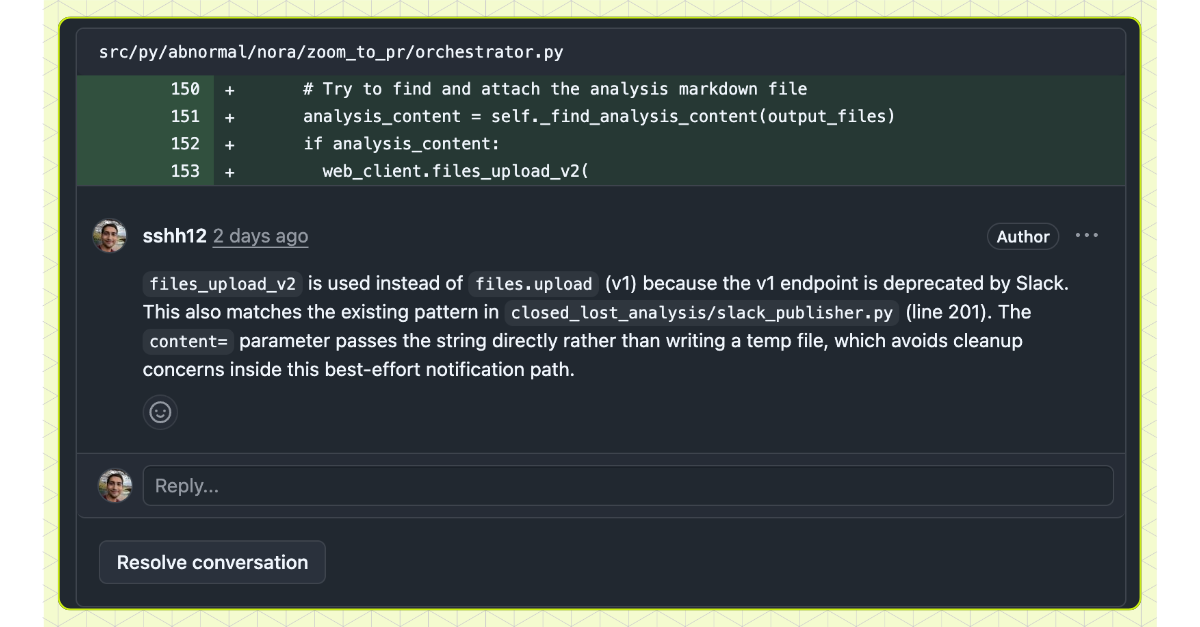
2. A PR review annotator agent runs after pushing. It analyzes the diff and adds inline GitHub comments surfacing non-obvious decisions and deviations from the plan for the reviewer’s focus:
3. The spec’s completed test plan also appears on the PR, including the automated checks and manual verification steps from each phase. Reviewers see not just what changed but what was validated.
4. Phased plans. The template encodes company-specific context on how to roll out changes, migrations, and deployments safely. Each phase roughly aligns with what previously would have been a human-written ticket, and plans can be split across multiple reviews for safer, more reviewable changes.
Triggered from Anywhere
Plans and PRs kick off from wherever engineers already work. CLI, Slack (@Nora create a plan to fix the …), or Jira (adding a label triggers research, planning, and PR generation). For customer-reported bugs, our support teams labels a Jira ticket and the agent produces a plan and its draft PR.
Beyond Engineers
Because the system files encode enough organizational knowledge, non-engineering roles like PMs and data analysts are building with this too. A PM patched a UI issue through Jira with no knowledge of the codebase or service architecture. The spec tool injected all of that from the system files. A data analyst built an analytics pipeline by providing requirements to the spec tool. Not just work that would have taken engineering a week, but work that was blocked because no engineer had time to prioritize it. Non-technical roles can now self-serve instead of waiting in a queue.
Open Source
We’re releasing the planning template and system file patterns as an open-source Claude skill.
/plugin marketplace add abnormal-ai/claude-plugins
/plugin install spec-tool@abnormal-ai
# Then run /build-spec-tool in any repo
If this is how you want to work, we’re hiring.